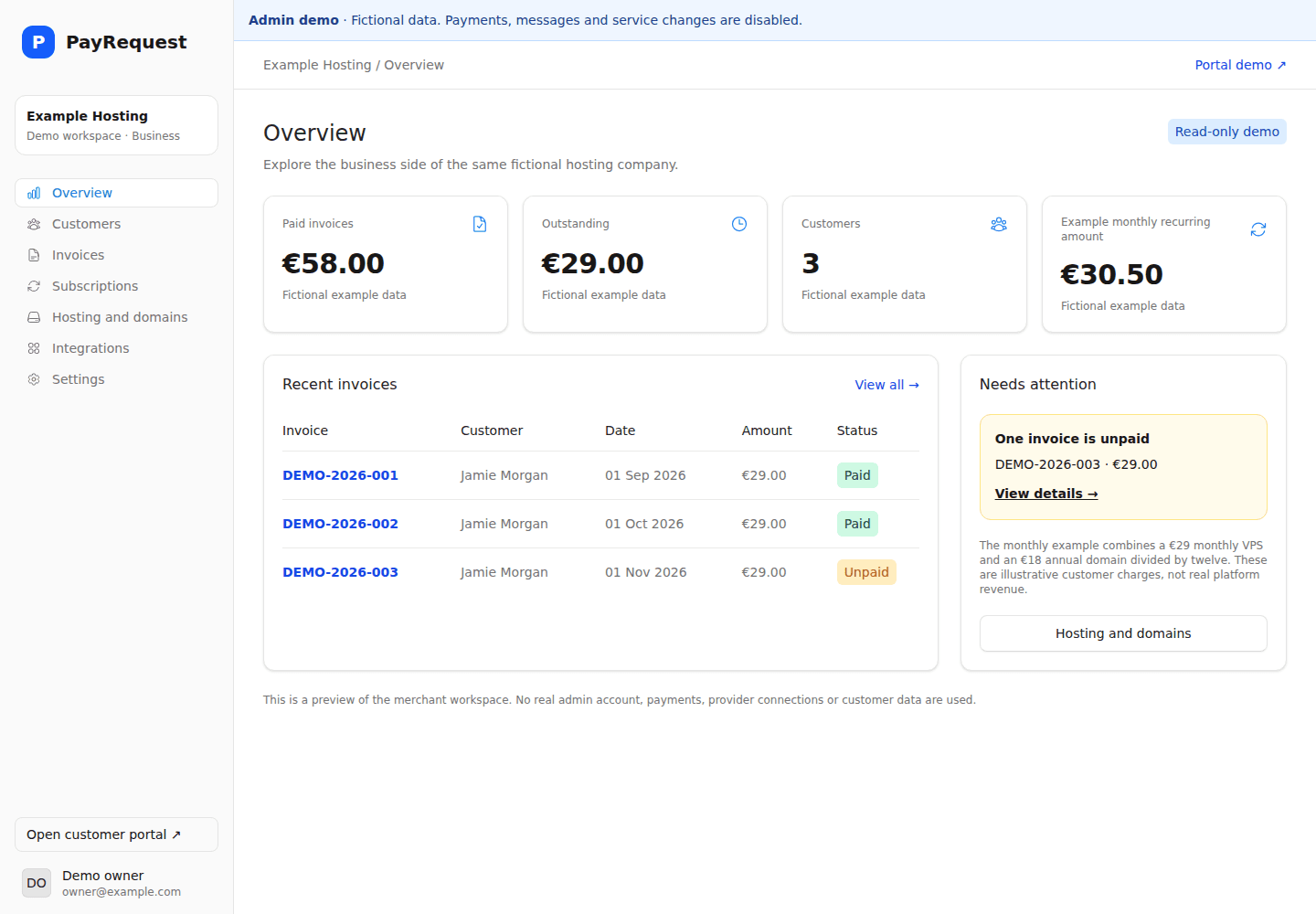
Facturas y suscripciones
Busca facturas, simula un pago, descarga un PDF y explora las acciones configuradas de pausa y cancelación.
Un portal moderno para agencias y revendedores cloud. Reúne facturas, suscripciones y servicios compatibles de Hetzner Cloud, DigitalOcean y dominios. Empieza con un máximo de cinco clientes acordados.
Completa la configuración de la cuenta y, a continuación, activa «Business» al finalizar la compra. Seleccionar un plan no activa las funciones de pago.
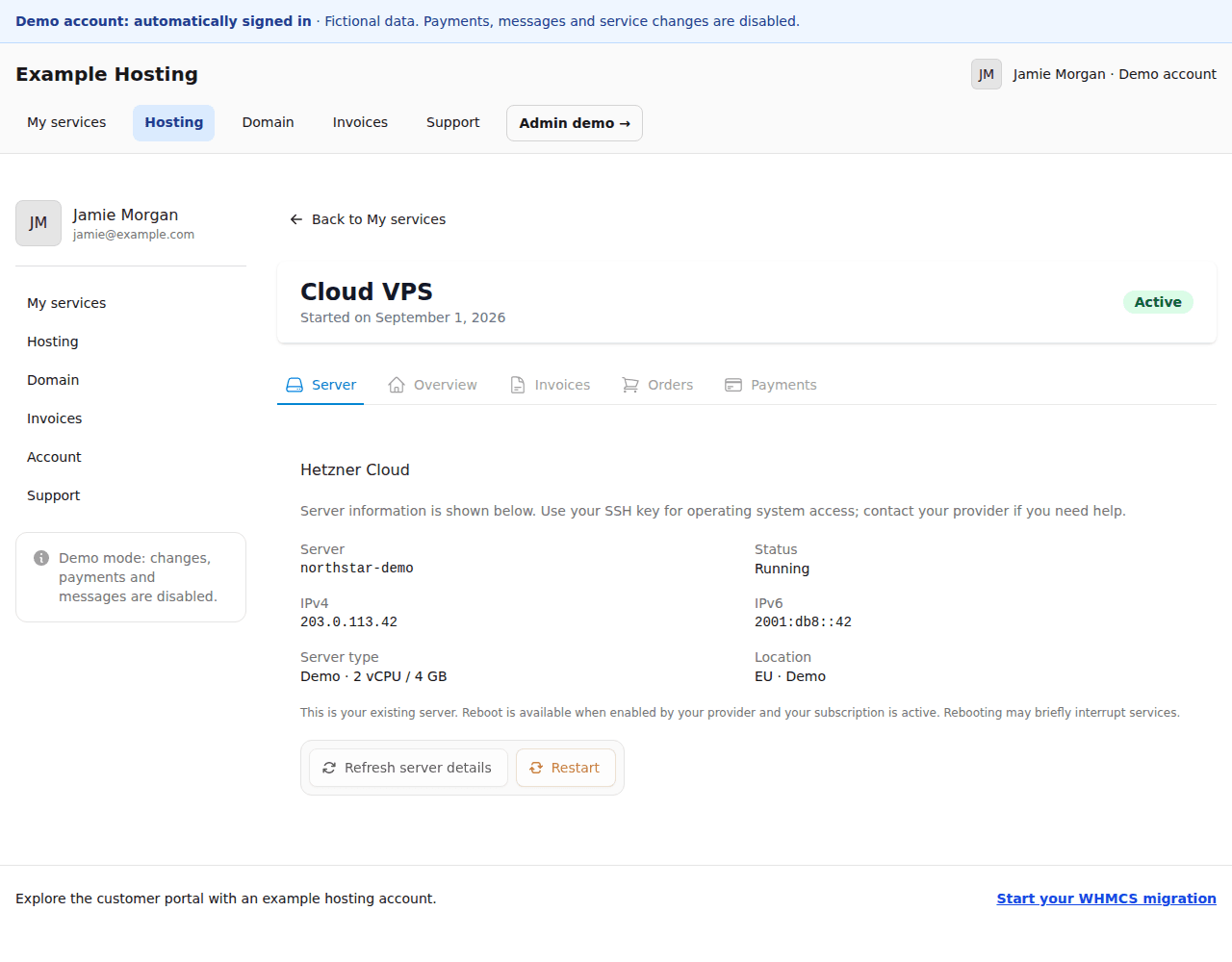 Explora la demo del portal
Contrata Business y realizamos la migración de WHMCS acordada sin coste adicional. Incluye toda la base de clientes acordada, sin límite de cinco clientes. Revisamos los archivos exportados y las dependencias antes de cambiar la facturación.
Busca facturas, simula un pago, descarga un PDF y explora las acciones configuradas de pausa y cancelación.
Vincula servicios cloud compatibles y ofrece controles permitidos. Consulta la información del servidor y las opciones de gestión en la demo del portal de solo lectura.
Explora un dominio ficticio de Openprovider con Cloudflare DNS. Las acciones de registrador y DNS dependen de las integraciones configuradas.
El alcance importa: la paridad completa de módulos cPanel/Plesk y los flujos DirectAdmin, Enhance o VirtFusion quedan fuera de esta oferta piloto. No prometemos un importador universal de WHMCS ni la transferencia automática de mandatos. Acuerda la responsabilidad de facturación y el ciclo de vida de los servicios antes del cambio.
Iniciar tu migración de WHMCSWHMCS ya incluye facturación periódica, facturas y un área de clientes. PayRequest es la solución ideal si deseas un portal de facturación alojado y gestión de suscripciones, y has comprobado que tus servicios de alojamiento seguirán funcionando correctamente.
Ofrece a los clientes un espacio con la imagen de marca de tu empresa para consultar y pagar facturas, descargar archivos PDF y gestionar las acciones relacionadas con las suscripciones compatibles.
Crea facturas recurrentes o cobra automáticamente mediante un mandato de pago válido. Verifica el proveedor y el mandato antes de la primera renovación.
Mantén o sustituye el sistema responsable del aprovisionamiento de cPanel/Plesk, la suspensión de servicios y los módulos de registro. PayRequest no es un sustituto directo de todos los módulos de WHMCS.
| Flujo de trabajo | PayRequest Business | WHMCS |
|---|---|---|
| Facturas y facturación periódica | El plan «Business» incluye facturación recurrente y autoservicio para los clientes. | Facturas integradas y facturación recurrente de alojamiento y servicios |
| Portal del cliente | Portal de facturación alojado y personalizado con acceso a facturas y suscripciones | Área de clientes para facturación, servicios y asistencia; los temas son configurables. |
| Pausa y cancelación | Se configura por producto; la cancelación puede ser inmediata o mediante solicitud con preaviso. | Depende de la configuración del servicio y de los módulos instalados. |
| Formas de pago | Proveedores conectados: el cobro automático requiere un mandato válido. | Módulos de pasarela de pago y sus flujos de tokens y pagos compatibles |
| Aprovisionamiento de alojamiento web | Consulta las integraciones compatibles o implementa un flujo de trabajo independiente. | Amplio ecosistema de módulos de aprovisionamiento de alojamiento web |
| Migración | Evalúa la correspondencia de datos, los mandatos y las fechas de renovación antes de iniciar una prueba piloto. | Los servicios existentes, las referencias a las pasarelas de pago y la automatización requieren un traspaso explícito. |
La documentación de WHMCS indica que Twenty-One es el tema recomendado para el área de clientes. Evalúa tu instalación concreta en lugar de dar por sentado que todos los portales de WHMCS están desactualizados. Documentación del área de clientes de WHMCS
Explora servicios, dominios y facturas en el portal de clientes, o clientes, facturación e integraciones en el espacio del negocio. Ambas demos usan datos ficticios; pagos, mensajes y cambios están desactivados.
PayRequest Business
€20 / mes
Primer mes pagado, con servicio de migración: €10. Después 20 € al mes. Sin descuento permanente ni coste adicional de migración. Para una primera suscripción Business, un mes de introducción por cliente. Elegir un plan no concede acceso: hay que completar la configuración y el pago. Los gastos del proveedor se cobran aparte.
Empezar Business — primer mes 10 €Comparar planes →| Nivel de licencia | Límite de clientes | USD al mes |
|---|---|---|
| Plus | 250 | $34.95 |
| Professional | 500 | $54.95 |
| Business 1000 | 1000 | $84.95 |
| Business 2500 | 2500 | $179.95 |
| Business 5000 | 5000 | $284.95 |
| Business 10000 | 10.000 | $399.95 |
Los precios de catálogo de WHMCS autohospedado se indican en dólares estadounidenses al mes, consultados el 7 de octubre de 2026. Los impuestos, los precios para revendedores, el alojamiento gestionado y los servicios adicionales pueden variar. Consulta la página oficial de pago antes de realizar la compra.
Precios oficiales de las licencias de WHMCSEstos productos abarcan ámbitos diferentes. Una suscripción de facturación de menor nivel no elimina los costes de aprovisionamiento, los módulos de registro ni las integraciones personalizadas.
Primer mes pagado, con servicio de migración. Después 20 € al mes. Sin descuento permanente ni coste adicional de migración.
Tras el pago, coordinamos la migración y solicitamos los archivos necesarios por un canal seguro acordado. Revisamos juntos los datos y el plan antes de trasladar clientes.
Datos de clientes y vínculos acordados con servicios y suscripciones. Facturas y abonos disponibles, conservando números, estados e historial originales.
Traspaso coordinado de facturación y controles finales para evitar cobros duplicados.
Contrata Business y realizamos la migración de WHMCS acordada sin coste adicional. Incluye toda la base de clientes acordada, sin límite de cinco clientes. Revisamos los archivos exportados y las dependencias antes de cambiar la facturación.
Las tarjetas guardadas, tokens y mandatos SEPA no siempre se pueden transferir. Depende del proveedor, la cuenta y sus reglas; algunos clientes deberán autorizar de nuevo. Traslados de servidores, gastos de terceros y módulos WHMCS personalizados o no compatibles requieren un acuerdo aparte.
PayRequest Business
€10
Primer mes pagado, con servicio de migración
Después 20 € al mes. Sin descuento permanente ni coste adicional de migración.
Tras el pago, coordinamos la migración y solicitamos los archivos necesarios por un canal seguro acordado. Revisamos juntos los datos y el plan antes de trasladar clientes.
Empezar Business — primer mes 10 €Explora la demo del portal →Para una primera suscripción Business, un mes de introducción por cliente. Elegir un plan no concede acceso: hay que completar la configuración y el pago. Los gastos del proveedor se cobran aparte.
PayRequest Business ofrece un portal de facturación para clientes en el que se pueden gestionar facturas y realizar las acciones relacionadas con las suscripciones. Evalúa por separado los servicios de alojamiento, la gestión de dominios, la asistencia técnica y los módulos instalados antes de sustituir por completo el área de clientes de WHMCS.
Puedes distribuir las responsabilidades de facturación y provisión de forma independiente, pero necesitas una integración definida y un único responsable de facturación. No des por sentado que los eventos relacionados con pagos, cancelaciones o suspensiones se sincronizan automáticamente.
No necesariamente. La idoneidad depende del proveedor, la cuenta, el mandato y la integración. Confírmalo antes de la migración; es posible que algunos clientes tengan que autorizar un nuevo método de pago.
Primer mes pagado, con servicio de migración: €10. Después 20 € al mes. Sin descuento permanente ni coste adicional de migración. Para una primera suscripción Business, un mes de introducción por cliente. Elegir un plan no concede acceso: hay que completar la configuración y el pago. Los gastos del proveedor se cobran aparte. Contrata Business y realizamos la migración de WHMCS acordada sin coste adicional. Incluye toda la base de clientes acordada, sin límite de cinco clientes. Revisamos los archivos exportados y las dependencias antes de cambiar la facturación.
Revisado el 7 de octubre de 2026