A Stripe payment link can collect the payment for a PDF, but payment collection and file delivery are separate jobs. To automate delivery, use a fulfillment service or build a verified fulfillment workflow. Redirecting every visitor to the same public PDF URL is not private delivery.
This guide is for a seller who already uses Stripe and wants to stop manually attaching a guide or workbook after every purchase. It is about one paid document, not a subscription paywall or an online course library.
Decide which checkout will own the purchase
There are two practical routes. Keep an existing Stripe-created Payment Link and connect fulfillment that supports it, or create the PDF as a native product in a managed selling service such as PayRequest with your eligible Stripe account connected.
A PayRequest PDF product creates a PayRequest product checkout link. It does not attach a file to an existing buy.stripe.com link or import that link's historical purchases. If you keep the old link active, it still needs its own delivery arrangement.
| Route | Payment and file mapping | What you manage |
|---|---|---|
| Existing Stripe link plus fulfillment | Supported partner or your own integration binds that checkout to the file | Integration, payment states, private storage and recovery |
| PayRequest native PDF product with connected Stripe | Product setup binds its own checkout to the uploaded document | Offer, file, provider readiness and customer support |
| Public success-page PDF link | Same public destination for everyone | Does not provide private per-purchase delivery |
Stripe's post-payment documentation describes partner and programmatic fulfillment options. Check whether the particular tool supports your checkout source; a service that issues its own links is not automatically an add-on to every existing Stripe link.
Why a redirect is not proof of payment
A buyer can pay successfully and close the tab before reaching your website. Conversely, knowing a thank-you URL does not prove someone paid. Stripe's fulfillment guide recommends server-side fulfillment using verified events, current payment state and handling repeated notifications safely. Payment methods with delayed confirmation need their eventual outcome checked as well.
If you build the integration yourself, separate identity, product/file mapping, payment confirmation and delivery authorization. Do not release a file from a browser query parameter, receipt screenshot or the mere arrival on a return page. Do not process the same confirmed payment twice when notifications repeat. This article does not supply a production webhook implementation.
Set up managed PDF delivery through PayRequest
For the managed route, create your account, complete setup and connect an eligible Stripe account through the normal connection flow. In Products, choose Sell a workbook / PDF, upload the document, check the title, total customer price, currency and included tax rate, then create the product link. Use the digital-product guide for the current setup and other formats.
The quick PDF flow accepts one PDF up to 500 MB. Eligible single PDFs without a chosen image or gallery can receive a public cover from page one; automatic cover rendering has a separate 100 MB source limit. Do not put confidential paid-only content on a first page intended for public preview.
Share the new product link wherever you previously presented the offer. A new unpaid visit is not a completed sale. PayRequest's current Stripe fulfillment checks the server-retrieved payment state before the supported paid delivery flow proceeds.
Plan for reading, downloads and failures
Paid buyers receive the supported protected delivery route. For eligible single PDFs, Read edition opens the browser's PDF viewer when supported. Download stays available.
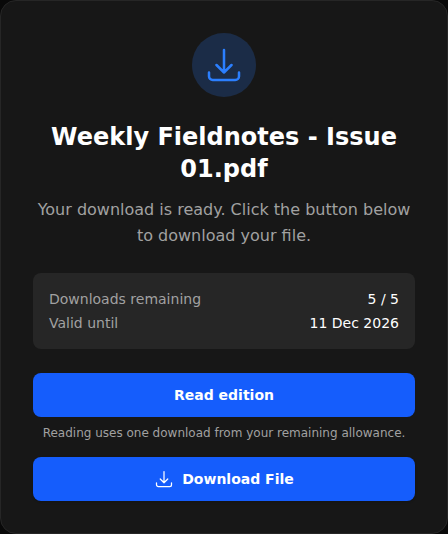
Reading consumes one remaining download. The quick PDF route currently uses five downloads within 30 days; check the actual settings and offer a support contact for access problems. Neither a browser reader nor a tokenized link is DRM: a legitimate buyer can save the file.
Use the payment-to-file state matrix when reviewing your own launch. It is a fictional planning worksheet, not a log of Stripe or PayRequest transactions.
| State | Expected delivery behavior | Check |
|---|---|---|
| Unpaid or pending | No paid-file access | Do not use the return page as authorization |
| Confirmed eligible purchase | Provide the matched product's delivery route | Check file and buyer/order relationship |
| Repeated notification | No duplicate fulfillment for the same purchase | Review idempotency |
| Expired or exhausted link | Explain the limit and support route | Do not promise permanent access |
| Refunded or disputed reading entitlement | Recheck eligibility before another opening | Preserve the original payment records |
Make the next-sale switch explicit
If you replace an old Stripe link, change the button on the page you control and record which product and file the new destination represents. Preserve the delivery and support arrangements for people who paid through the old route. A new PayRequest link is not a migration of Stripe customer history or recurring mandates.
PayRequest digital products are available on Free with a 2% standard platform fee capped at €25 per transaction. Active Premium (€5/month) and Business (€20/month) remove the standard platform fee. Stripe/provider charges and commission exceptions remain separate; see current pricing. The managed delivery service is not Stripe's native fee schedule.
Editorial note: current implementation and official documentation reviewed on 13 November 2026. The matrix is an original fictional example; the screenshot is the real template with fictitious data. No live payment, external-link integration or sales result was tested. AI assisted with writing and the illustrative cover.