You can offer Klarna without a webshop by sending customers a hosted PayRequest payment link through Instagram or WhatsApp. For the flow covered here, you need your own approved, payment-ready Mollie account with Klarna enabled. The customer supplies billing details and continues to Mollie/Klarna, where the available payment options and approval are determined.
This is for small businesses that already agree orders in messages and want an alternative to asking every buyer for a bank transfer. A hosted checkout handles payment collection; you still need clear order terms, suitable fulfilment and a way to answer customer questions. Neither creating a PayRequest account nor sharing a link guarantees that Klarna will accept your business or approve a buyer.
When does Klarna without a webshop make sense?
A payment link is useful when the conversation already contains the sales work. A customer asks about an item, you confirm availability and the total, and the missing step is a clear place to pay. Building a full product catalogue may be unnecessary for that particular order. The link can take the customer from a private conversation to a payment page without moving your entire business into an ecommerce platform.
The important distinction is between offering Klarna and promising a particular financing arrangement. A buyer may see different options depending on their circumstances and transaction. Describe the method as Klarna and let the actual checkout show the offer. Avoid advertising a fixed instalment schedule unless you have verified that it applies to the customer and transaction.
Start by confirming that Mollie and Klarna accept your business and product category. A technically available link does not remove provider restrictions. Read the PayRequest Klarna setup documentation before advertising the payment option. For general background rather than a social-sales workflow, use the existing Klarna payment guide.
A worked Klarna order from Instagram message to payment
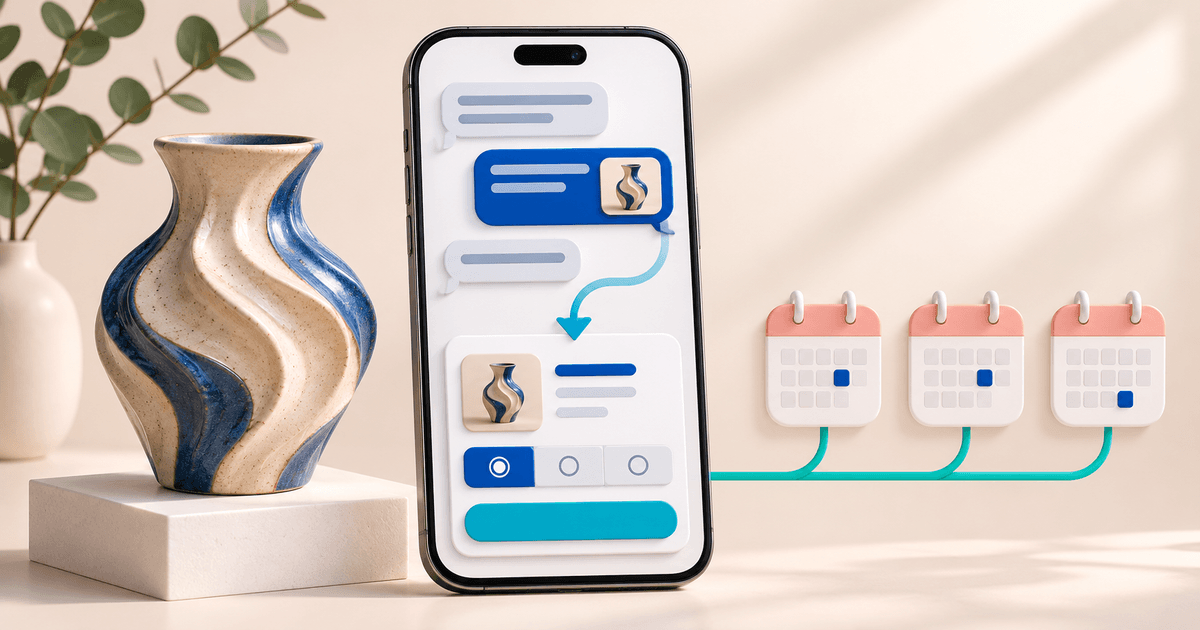
Consider an illustrative ceramic studio selling a ready-made vase for €180 including delivery. This is a workflow example, not a customer case study or a claim that Klarna approves this amount. The buyer messages the studio after seeing a post. The studio checks stock and confirms the total before creating the payment request.
The seller records the item, quantity, delivery arrangement and customer reference. In PayRequest, the description should identify the agreed order, such as “Blue ceramic vase, one item, delivery included, order CER-104.” A generic description like “Instagram payment” leaves the buyer with less information to check and makes later order matching harder.
The business then shares its hosted payment link in the conversation. The customer opens it, selects Klarna when offered, completes the displayed billing fields and continues to the provider. The seller checks the actual payment status before treating the order as paid. Seeing a Klarna logo, completing an address or returning to a confirmation screen is not a substitute for verifying the recorded transaction.
| Order stage | What the studio records or checks | What it must not assume |
|---|---|---|
| Agreement | Item, total, delivery and reference | A message is a successful payment |
| Link creation | Correct amount and order description | Every buyer receives pay-later terms |
| Klarna selection | Required billing fields are displayed | Completing those fields means approval |
| Provider decision | Actual payment result | A declined payment can be fixed by sending duplicates |
| Fulfilment | Payment state and agreed delivery terms | A buyer screenshot proves settlement |
This small record makes the workflow useful beyond a single transaction. If the customer asks about delivery later, the conversation and payment can both point to CER-104. Keep delivery information separate from the assumption that billing details automatically constitute a complete shipping instruction.
Set up Klarna payment links through Mollie
Connect the Mollie account you intend to use and complete its verification. In the connected Mollie website profile, enable Klarna if it is available for your business. Then open PayRequest Provider Settings. If you use a custom selection of Mollie methods, include Klarna rather than assuming every enabled provider method appears in that selection.
These are separate checks. A connected account may still need approval; an approved profile may not offer a particular method; and a custom method list can leave an enabled option out. The Klarna payment-link feature page describes the product destination, while the documentation gives the setup sequence.
Review your normal public Page or payment link after configuration. Select Klarna and check that the expected billing fields appear. This is a configuration review, not proof of a completed payment. Any real payment test should follow your provider's guidance and be recorded as a test with its actual outcome.
You do not need to replace every existing link simply because you add a payment method. The documented PayRequest flow uses your existing Page and payment links when Klarna is available through the connected account. Confirm the exact order details each time you reuse a general page for a specific sale.
What should the buyer see before choosing Klarna?
Before payment, state the item, full agreed total, delivery expectations and how the buyer can contact you. If you have agreed a variation, size or colour in chat, include enough information to avoid confusion. A payment page should continue the agreement rather than introduce a surprise amount or unclear seller identity.
Selecting Klarna in PayRequest opens fields for first and last name, email, street and house number, postal code, city and country. The buyer supplies these details in the payment flow. You do not need to ask them to send payment-card information through Instagram or WhatsApp. The required Klarna fields do not prevent the customer from selecting another available method instead.
A useful message template is: “Your total for order CER-104 is €180 including delivery. Here is the payment link: [your link]. Klarna may be available at checkout, subject to eligibility and approval. Delivery will follow the terms we agreed. If you cannot use Klarna, choose another offered payment method.” Replace the illustrative details before sending.
This message avoids a common source of disappointment: presenting pay later as already approved. The provider decides what to offer, and the customer should be able to review those terms themselves. Mollie's Klarna documentation explains the method's supported markets and approval constraints.
What if Klarna is missing or declines the payment?
If Klarna is absent, check the payment readiness of the correct Mollie profile, method availability and your PayRequest selection. If the customer reaches Klarna and is declined, reconnecting your provider account does not override that decision. Offer an available alternative and keep the original order reference so you can reconcile the outcome.
If the payment is pending or the buyer says they have already been charged, inspect its status before asking them to try again. A second link can create a second payment attempt and leave both parties unsure which transaction belongs to the order. Record the reference, time and status, then contact support if the state remains unclear.
For a business taking orders in several conversations at once, assign one person to confirm the final paid status before fulfilment. The important control is consistent ownership of that decision. It is more useful than repeatedly asking the customer for screenshots or treating every message notification as a payment update.
Compare costs and delivery responsibilities before launch
Budget separately for PayRequest platform fees, provider processing fees and the work of delivering the order. At publication, PayRequest offers Free at €0 per month with a 2% standard platform fee, Premium at €5 per month and Business at €20 per month with 0% standard platform fees while the paid plan is active. Provider fees and commission-payment exceptions remain separate; check current pricing and your Mollie agreement.
For example, a 2% standard platform fee on the illustrative €180 order is €3.60, before provider fees. This calculation does not tell you the total Klarna cost or the timing of settlement. Use the rate applicable to your own account, and do not confuse a customer's payment schedule with the provider's payout schedule to your business.
Adding Klarna also does not transfer every delivery, refund or dispute responsibility away from you. Verify that your fulfilment process and provider arrangement fit what you sell. Keep clear order records and contact information. Avoid claims that accepting the method makes a sale risk-free.
Prepare one social order before promoting Klarna
Choose a normal, eligible product and write down its amount, reference, delivery terms and fallback payment option. Review the public payment page and the billing fields. Decide who checks payment status and who fulfils the order. These checks form a repeatable order process that your team can use whenever a customer asks how to pay.
For mobile buyers who prefer a wallet rather than a Klarna offer, see Apple Pay for WhatsApp and Instagram sales. To decide which options belong together, use the Apple Pay versus Klarna payment-page comparison. Start with a PayRequest payment page that accurately represents the order you have agreed.
Key takeaways: a hosted link can complete an order agreed in chat; Mollie eligibility and Klarna approval are separate requirements; billing details are part of checkout; and fulfilment starts with a checked payment state. The next useful step is to prepare one clear order, then create its payment link.
Editorial note: prepared with AI assistance using the linked product documentation, checked on 2 November 2026. The order, message and calculations are illustrative; no live buyer payment test is claimed.