A drone-rental security deposit should be tied to a named aircraft kit, paired dispatch and return evidence, and an itemized capture-or-release decision. Record the airframe, gimbal, propellers, controller, batteries, chargers, cases and removable media, but keep the financial checklist separate from airworthiness and legal flight approval.
This workflow is for businesses renting camera drones and enterprise aircraft. Its original asset is a four-record custody pack: condition ledger, functional check, battery log and flight-responsibility record.
Keep Four Records Separate
| Record | Purpose | Deposit relevance |
|---|---|---|
| Condition ledger | Compares the same physical surfaces at dispatch and return | Supports changed-condition evidence |
| Functional check | Confirms power-up, controls, gimbal and camera behavior | Helps classify a new fault |
| Battery ledger | Pairs serial, charge state, cycles and visible condition | Supports missing or damaged-battery evidence |
| Flight responsibility | Records operator, custody time, incident and log handoff | Provides context; it is not automatic proof of liability |
A signed checklist does not make a drone airworthy, authorize a flight or transfer every regulatory duty to the renter. Follow current manufacturer instructions, aviation rules, insurance conditions and qualified maintenance procedures for the aircraft and jurisdiction.
Build the Dispatch Record
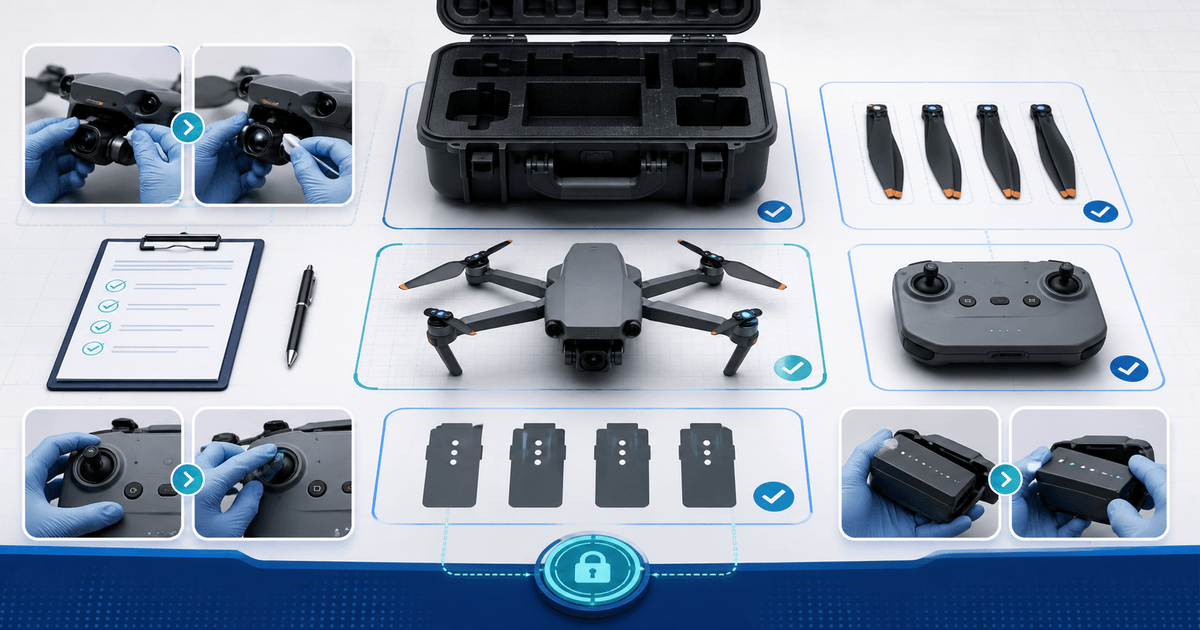
Start with the aircraft and kit IDs in frame. Photograph the upper and lower shell, each arm and motor, landing structure, sensors, camera lens, gimbal stops, controller screen and ports. Lay out props, chargers, cables, filters, cards and cases in assigned positions so return photos can repeat the view.
Pair every intelligent battery by serial. Record visible swelling, impact marks, connector condition, displayed charge and the cycle or health value available in the approved app. Battery metrics are diagnostic context, not a promise of remaining life.
Run the documented power-on check without improvising an unsafe indoor flight: controller link, firmware/version record, gimbal movement, camera feed, storage recognition, navigation/sensor warnings and a short motor check only where manufacturer procedure and the environment permit it.
Set the Custody Boundary
Record the named renter or authorized operator, handoff time, expected return, included flight-log export method and what must happen after a hard landing, water exposure, prop strike, flyaway or warning state. Require the renter to stop using and isolate questionable batteries or aircraft rather than “testing whether it still flies.”
The deposit amount should come from the operator's real exposure—common repair, missing accessories, insurance excess and replacement delay—not an unexplained percentage of retail value. Disclose what the hold covers, authorization timing, inspection window and evidence route before the customer authorizes it.
Repeat the Return Check
Do not mix returned props, batteries or cards into available stock before reconciliation. Repeat the same photos and power-on sequence, export the agreed logs, and classify each exception as pre-existing, ordinary wear, missing component, new visible damage, new functional fault, incident pending technical assessment or unrelated operational issue.
For a reported strike, water event or warning, quarantine the aircraft for the appropriate technical inspection. A normal-looking shell is not enough to release it for another customer, while a safety inspection finding is not by itself a deposit charge. Connect any financial decision to the contract, custody evidence and supported cost.
Capture or Release the Hold
Release promptly when the kit reconciles and the inspection route is complete. For a missing filter or supported repair, identify the unit, changed state, relevant term and itemized amount. Capture only the supported amount when the provider and terms allow partial capture; release the remainder.
Equipment-rental security deposits provide the closest PayRequest setup path, while the security-deposit dashboard records authorization status, countdown, release and capture events. Close the job only after customer communication and the financial event match the custody record.