To sell a PDF sewing pattern online, prepare the formats you have actually tested, show what the buyer will make and deliver the clearly named files after payment. A single PDF can have an automatic first-page cover and browser reading in PayRequest. A multi-format ZIP needs its own cover and is downloaded and extracted.
This guide is for independent pattern designers. The release matrix below is a proposed checklist, not evidence that PayRequest tested a garment's fit or a particular sewing pattern.
Prepare the formats you promise
| File | Buyer use | Check before release |
|---|---|---|
| A4 tiled PDF | Home printing on A4 | Print at 100%, measure the test square, assemble adjacent tiles |
| US Letter tiled PDF | North American home printing | Repeat the scale and clipping check on Letter paper |
| A0 PDF | Copy-shop printing | Check every piece, label and page boundary in the intended output |
| Layered PDF | Print selected sizes | Keep essential labels visible when hiding other sizes |
| Projector PDF | Project before cutting | Calibrate and measure both axes; test the largest pieces |
Named Clothing's pattern instructions explain test-square checks and keeping the pattern-information layer active. Use your own pattern's stated measurements and test each advertised format independently. Correct print scale does not establish garment fit: have suitable makers test the construction instructions and size range separately.
Put a useful preview before the paid pieces
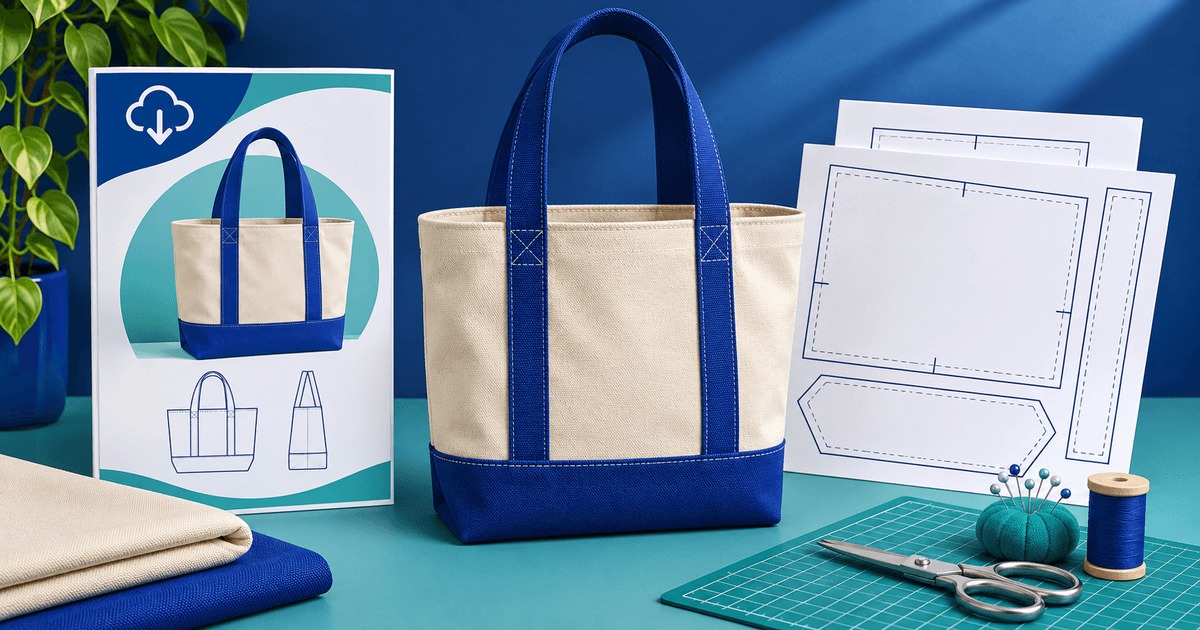
Lead with the finished garment, a technical drawing, the size range and the supported paper formats. Explain seam allowance, materials, skill level and whether the purchase includes instructions. A cover should help a buyer distinguish the design from another pattern in your shop.
For a single-PDF product, PayRequest can use page one as its public cover if no custom cover or gallery is present. Choose that first page deliberately: avoid placing the full printable pattern there at a resolution that substitutes for the paid file. Automatic rendering covers eligible PDFs up to 100 MB; larger, damaged or encrypted files may require a manual image. The PDF upload limit is separate.
A gallery photo you chose is preserved. If a finished-garment photograph communicates the pattern better than the first page, keep that photograph as the cover.
Choose single PDF or ZIP before creating checkout
A single combined PDF works when one file contains the instructions and the exact pages the buyer needs. Use a versioned ZIP when you provide separate A4, Letter, A0 or projector editions. Example structure: 01-instructions, 02-a4, 03-letter and 04-a0. Include a short file-selection guide and remove unapproved exports.
A ZIP does not become an online PDF library. Its internal PDFs do not receive individual automatic covers or Read edition buttons. Upload a manual product image and tell buyers they need to extract the package. Do not promise a browser reader for that ZIP.
Create the paid product
Complete PayRequest setup and connect an eligible payment provider. For one PDF, choose Sell a workbook / PDF in Products; for the ZIP, use the full digital-product editor. Describe the tested sizes and formats, then check the customer price, currency and applicable tax settings. Follow the digital-product setup guide.
After confirmed payment, buyers receive the existing protected delivery link. Eligible single PDFs additionally offer Read edition in the supported confirmation, download and customer-account views.
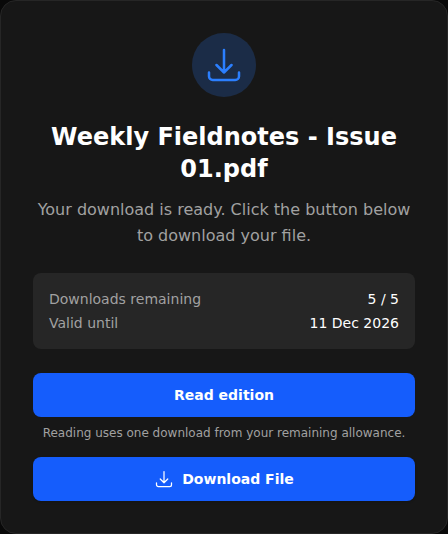
The screenshot shows the real delivery template with fictional publication data. A pattern PDF uses the same controls; this is not a pattern sale or a garment test.
Separate reading from print preparation
Reading opens the PDF in the browser when supported and uses one remaining download. It does not guarantee that the browser handles size layers or prints at the intended scale. Tell buyers to download the file and use a suitable PDF reader for the workflow you tested. Check Actual Size or 100%, print the calibration page first and measure it before printing all tiles.
The quick PDF flow currently uses five downloads and a 30-day link lifetime. Check the actual product settings and give buyers a support route for expired or exhausted links. Do not describe this as permanent access. Saving the paid file does not prevent onward sharing.
Set up a storefront for your first three PDF patterns
An illustrative catalog could have a beginner tote at €8, a lined pouch at €10 and a three-size bag pattern at €14. Give each pattern a separate product page with a finished-project cover, the difficulty and a clear list of included print formats. Keep one shop link in your profile and send a direct product link when you show a finished project in a tutorial.
For the tote listing, use this buyer-facing checklist:
- Cover: show the finished tote and indicate whether the listing is for a digital sewing pattern.
- Preview: show the finished measurements, materials and one sample page. Keep the complete pattern pieces in the paid download.
- Included files: list only checked editions, for example A4, US Letter, A0 and a separate instructions PDF. State whether seam allowances are included.
- Delivery: package those exact editions in the approved ZIP. Test that the checkout displays the tote name and price and that the delivered archive opens with the correct formats.
Use PayRequest digital products to create a listing for each design and link the catalog from your existing audience channels.
Finish the buyer-view check
Verify the public cover and description on a phone. Open each delivered file from the approved package on a clean device, check filenames against your instructions and record the version. Give clear personal-use or commercial-use terms only for rights you can grant. Test delivery with a suitable test arrangement; no live payment or sewing-pattern purchase was made for this article.
Digital products remain available on Free. Standard platform fees, optional paid-plan terms and provider charges are described on pricing. For a simpler single document, see selling a PDF by payment link.
Editorial note: updated 11 November 2026 for the verified cover and PDF-reading behavior. AI assisted with editing. The checklist does not certify fit, print accuracy or projector compatibility.